
Everything it does.
The whole list, from the setup to the player: 125 things that work today, across the server, the web app and the TV apps. Search it, or jump to a part.
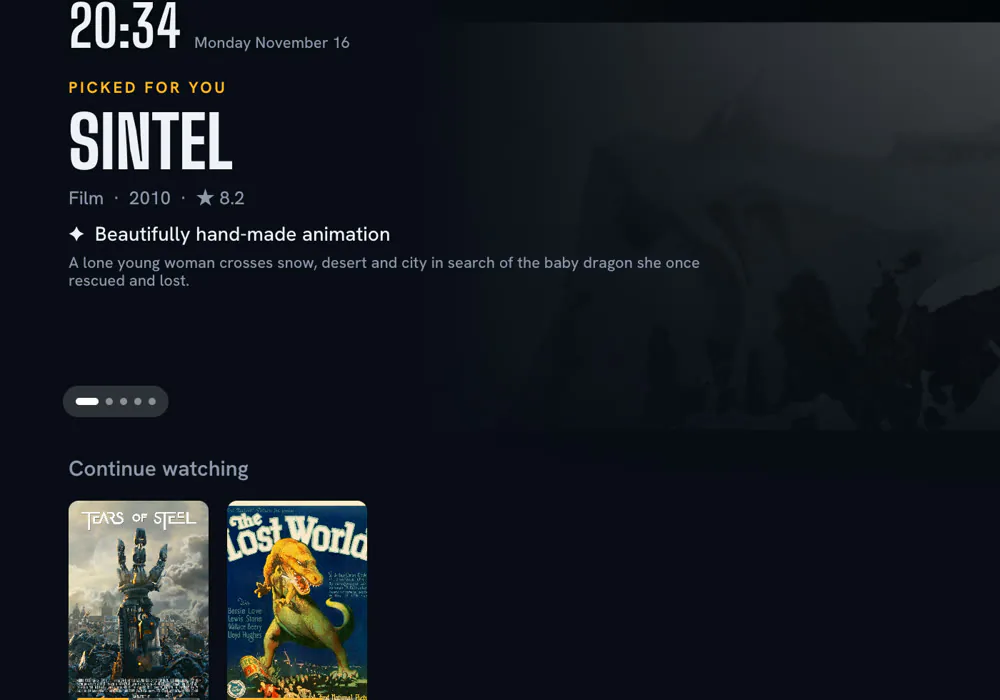
Your Home and AI
Each person gets a Home that knows their taste, and says why it picked each title.
Smart Search on the TV
A Home for each person
Every profile gets its own Home, with rows the AI builds from what that person loves.
A reason on every pick
Each pick tells you in one short line why it suits you.
Smart Search
Describe a mood or a plot in plain words, like “a thriller where the villain wins”, and get real titles.
Smarter “More like this”
Similar titles show at once, then the AI swaps in picks with the same feel and tone.
Rows the AI names
Themed rows like “Gritty crime thrillers” are named and filled just for your taste.
Keeps your language mix
The AI keeps your blend of languages instead of pushing only what’s popular everywhere.
Real Top 10 charts
Weekly Top 10 shows and movies for Canada, India, the US, the UK and Australia.
Eleven language worlds
Hindi, Korean, anime, Tamil and more each get rows of new, popular and top-rated titles.
Smart Continue watching
Shows with new episodes move to the front, and each card points at your next episode.
Ratings that teach
Love it, Like it or Not for me: each rating shapes what you’re shown next.
Not interested
One click hides a title everywhere and steers the AI away from lookalikes.
Shows and Movies pages
Each has its own top picks, themed rows, genres and Top 10, never repeating Home.
Works without AI
No AI key? Your Home is still ranked from your taste, just without the AI extras.
Households and profiles
One server for the whole family, and for friends too, each kept apart.
Who’s watching?
Up to 6 profiles, each with its own Home, history, languages and picture quality.
Many households, one server
Family and friends each get their own profiles, devices, sources and AI key, fully apart.
One-time invites
Share an 8-character code or a link that works once, for one device, within 24 hours.
Invites with a name
Make an invite “for Bedroom TV” and the device joins with that name.
Watching now
See every TV and browser in the house, who is watching what, and how far along.
Device control
Rename or remove any device, or give a reset TV a code so it rejoins as itself.
28 friendly avatars
Fox, panda, dragon, robot and more, each with its own colour glow.
Admin PIN
A 4 to 8 digit PIN guards household settings, and locks for longer after wrong tries.
Languages in their own script
Audio and subtitle languages are shown in their own writing, like हिन्दी or 日本語.
Settings that follow you
Your settings live on the server, so every screen you use already knows them.
Sources
Add-ons in the open Stremio format, services you already have an account with, and your own library, all in one Home. For every title Nightcap finds the best version to play. Your household chooses its sources; Nightcap itself doesn’t host or sell films.
One key, all set
Paste your streaming service key and Nightcap sets up its source finder for you.
Sources you choose
Each household picks its own add-ons and services, and can change them any time.
Services you already use
Link a service you have an account with by its key, and Nightcap sets up the rest. A household can use several.
Add-ons you choose
Any add-on in the open Stremio add-on format: up to 20 for streams and 20 for subtitles, each with a Test button.
Straight to your screen
Video plays directly from where it’s hosted, never through other people’s computers.
Use your own finder
Already run your own source finder? Point Nightcap at its address instead.
Add-on health report
Add-ons that time out or don’t play show up in a seven-day list.
Stays inside your limits
Nightcap keeps to your service’s request limits, so your account is never flooded.
Clear source problems
A bad key, a missing plan or a hit limit are each told apart in plain words.
Heals its own setup
A slow add-on is left out for now and quietly added back later.
Bring your own AI
Use the AI you like with your own key, and always see what it costs.
Any AI you like
Claude, OpenAI, OpenRouter or any compatible address, even a model on your own computer.
Each household pays its own
Every household uses its own key, its own model and its own monthly limit.
Pick your model
Choose from the models your key can use, with prices shown for the ones Nightcap knows.
One-click key test
Test your key before saving, for a fraction of a cent, with a plain message if it fails.
A monthly limit that holds
Set a monthly limit, and models with a known price never go over it.
Spend you can see
This month and today, a 30-day chart, and each profile’s share of the spend.
Spend on the TV Home
A corner widget shows the household’s AI spend, with a “+” when a price is unknown.
Nothing stops at the limit
At the limit only the AI pauses, and Home, search and playback carry on.
Cheap by design
The AI runs only when an app is open and a refresh is due, and answers are reused.
Free models welcome
Mark any model as free, including one running on your own machine.
Set up once, use everywhere
Add your AI key in the browser and every TV gets Smart Search and AI rows.
The player
Press play and the right file starts, in your language, with no error codes.
Picks the right file
Every source is scored on language, quality and picture, so the best one plays first.
Your language comes first
A version in your language wins over a sharper one in another language.
Wrong-file protection
Running times are checked, so samples, error clips and wrong episodes go last.
Tells you why
The loading screen says why it chose this version, like “Hindi audio, your setting”.
Switch language mid-film
Pick another language and Nightcap finds a version that has it, from the same second.
Never loses your place
Drops reconnect from the same moment, and old play links renew quietly.
Up next, no wait
25 seconds before the end, the next episode is ready, in the same version and languages.
Resume on any device
Start on the TV and finish on your laptop, right where you stopped.
Remembers your picks
Audio and subtitle choices stay with each show for the whole binge.
Subtitles that match
Subtitles are grouped by language, with the best match for your file first.
Look for more sources
One button asks every add-on again when the first choices don’t suit you.
Calm, plain messages
You see “Getting it ready…” and simple next steps, never an error code.
“How was it?”
After a film, one press rates it, and it never gets in the way.
Browser and phone
The full Nightcap in any browser, and your phone doubles as a remote.
Play on TV
Pick a title on your phone or laptop and send it to a TV, which plays it on your profile.
Dolby and DTS sound
Files that are silent in a plain browser play with full sound in Chrome and Edge.
Opens while the server sleeps
The app appears at once with your last Home while the server wakes up.
Send links to the TV
Paste a video link and it plays on the TV, with a preview picture on Android TV.
Hover to preview
Point at any poster and the big picture at the top becomes that title.
Made for phones too
A bottom bar, swipeable rows, and full-screen video when you turn your phone sideways.
Touch and keyboard controls
Double-tap to skip 10 seconds, or use Space, the arrows and F on a keyboard.
Menus everywhere
Right-click, long press or tap ⋯ to add to My List, mark watched or hide a title.
Settings that show you
Quality, subtitle and language choices preview live with a real picture or line of dialogue.
Small and fast
The first load is small, and the player only loads when you need it.
Updates at the right moment
A new version waits for a quiet moment and never reloads during a film.
Home-screen icon
Add Nightcap to your phone’s home screen; it opens in the browser for now.
On the TV
A big-screen app for Android TV, Google TV, Samsung and LG, built for the remote.
Trailers that play themselves
Rest on a title and its trailer fades in behind it at a gentle volume.
Finds your server itself
On a home server the TV finds Nightcap on your Wi-Fi; Docker Desktop needs the address once.
Join with a code
For a cloud server, type an 8-character code once or open an invite link.
Same on every TV
Samsung and LG get the same screens and wording as the Android TV app.
The TV asks first
When someone sends a title, the TV pauses and asks before playing it.
Updates from your server
The TV apps update from your own server, with no app store wait.
Clock, weather and spend
Corner widgets show the time, local weather and AI spend, and you can turn them off.
Opens in an instant
Your last Home appears at once and refreshes in place, so nothing jumps.
One TV, several servers
Join a home server and a cloud server, then switch between them with one press.
Search by voice
Speak into your TV keyboard’s microphone to search, on TVs whose keyboard has one.
Live TV
Add your own channel lists and get a Live TV page that looks and feels like Home.
Your channels, like Home
Add your own channel lists and get rows, favourites and a big picture of the channel you’re on.
Live preview
Rest on a channel and its live picture plays, muted, at the top of the screen.
Matches with several cameras
One match card can hold several feeds, like the main view and a tactical cam.
Live, soon and 24/7
Events show when they start, go live on time and disappear when they end.
Duplicates merged
The same channel from two lists becomes one, with the best stream first.
Broken channels hide
Channels that never play hide for a week, and you can try them again any time.
Browse and search everything
A wall of logos you can filter by kind, country and language, or search by name.
My channels
Add any channel to your favourites row with one press.
Remote keys just work
Channel up and down work while you watch, and the first press shows where you are.
Your own videos too
Live TV can carry your own cameras and home videos, not just TV channels.
Big lists welcome
Up to 5 lists of up to 20,000 channels each, refreshed on your schedule.
Paid lists stay private
List addresses are encrypted on your server and never sent to your devices.
Setting up and running the server
One command and a few friendly questions, and your server is running.
The guided setup in a terminal
One-line install
One command installs the nightcap tool on Mac or Linux, and every download is checked.
Four places to run
This computer, your Kubernetes cluster, Google Cloud Run, or another machine with Docker.
Ready in about five minutes
A guided setup asks one question per screen and finishes in about five minutes.
Low running cost
On Google Cloud Run it sleeps while nobody watches, and setup shows the cost before anything is made.
A database made for you
At home the database is set up for you; in the cloud, paste any Postgres address.
Checks as you go
Keys and database are tested live, with plain-English help when something is wrong.
Best region from your clock
Google’s regions are ranked by distance and price, and the top three are suggested.
Review before anything happens
Check every answer, and the cost, before anything is created.
Try again where it stopped
If a step fails, setup picks up from there without making duplicates.
Plugins
Run your own add-ons next to your server, in the same place it runs. The setup tool adds, updates and removes them.
Leaves your things alone
Setup never overwrites or deletes anything it didn’t create.
For the server owner
Run the server from a control panel in your terminal and an owner page in your browser.
A terminal control panel
Live status, households, profiles and devices for every server, refreshed every few seconds.
Live cloud cost
See what Google Cloud has cost so far and what this month will likely cost.
Live logs
Follow logs live, show only errors and warnings, and search, with secrets hidden.
One-key update
Update to the newest version with one key, then it checks the server answers.
Restart, stop and start
Restart any server, and stop or start home servers without losing data.
Owner page
Create, rename and remove households, choose admins and reset PINs from your browser.
Move households anywhere
Export households to a password-locked file and import them on another server.
Update notices
You’re told when a newer server is out, without extra load on it.
Safe removal
Type the name to confirm, and databases and projects you own are always kept.
Your own limits
Change profile, device and invite limits in one file, and every app follows.
Light on resources
It uses about 215 MB of memory and runs no background jobs, so it can sleep.
Update the tool itself
nightcap update installs the newest checked version on Mac and Linux.
Privacy and security
Your server, your data and your keys, with no Nightcap account in between.
Keys stay on your server
Your streaming service and AI keys never reach a TV or phone.
No account, no tracking
There’s no Nightcap account and no tracking: your server, your data.
Secrets locked away
Saved keys and channel lists are encrypted, and only shown with most of them hidden.
Invite codes out of logs
The code sits after the # in an invite link, so it never reaches server logs.
Secure over the internet
Internet servers must use https, so join codes can’t be read on the way.
Video skips your server
Video goes straight from the file host to your screen.
Limits on wrong guesses
Wrong codes and PINs are limited, and lockouts grow longer each time.
Removed devices cut off
Remove a device and its key stops working at once.
Passwords never shown
Setup shows passwords as dots and removes them from logs and errors.
Files only you can read
Setup files that hold keys can be opened only by your own user.
Private home database
At home, the database only listens on your own computer.
Nothing matches that.